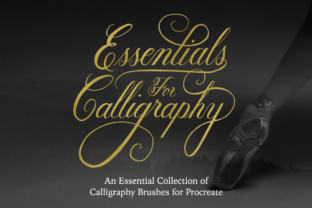
IPad Calligraphy Brushes for Procreate
Digital calligraphy has evolved significantly over the last decade, transitioning from a niche skill requiring specialized physical tools to an accessible discipline available on portable devices. For artists and designers working within the Apple ecosystem, iPad Calligraphy Brushes for Procreate represent a streamlined solution for integrating traditional lettering aesthetics into digital workflows. This specific asset pack is designed not as a universal tool, but as a targeted utility for users who require precision, variety, and speed in their script-based projects. Understanding its capabilities requires looking beyond marketing language and examining how these brushes function within the constraints of the Procreate environment.
The core value proposition of this download lies in its specialization. Unlike broad brush packs that attempt to mimic every possible texture, this collection focuses strictly on calligraphic forms. It includes five distinct calligraphy styles ranging from formal elegant scripts to bouncy modern variations. Additionally, it provides a monoline option and nine guideline brushes to assist with structural accuracy. However, prospective users must first acknowledge a critical limitation: these brushes are exclusive to the Procreate application. They will not function in Photoshop, Illustrator, or any other graphic design software. Furthermore, they require an iPad equipped with a pressure-sensitive stylus, such as the Apple Pencil. Without hardware that supports tilt and pressure data, the dynamic behavior of these brushes cannot be realized.
Core Brush Components and Performance
The package contains five primary calligraphy brushes, each engineered for a different aesthetic outcome. The inclusion of both smooth and textured options allows creators to choose between clean, vector-like edges and organic, gritty finishes. This duality is particularly useful for commercial projects where consistency is paramount versus personal journals or artistic pieces where imperfection adds character.
- Copperplate Formal Script Brush: This brush mimics the high-contrast strokes characteristic of traditional copperplate engraving. It relies heavily on pressure sensitivity to create thick downstrokes and hairline upstrokes. It is ideal for formal invitations, wedding stationery, and elegant branding elements.
- Modern Casual Script Brush: Designed for a looser, more contemporary feel, this brush offers flexibility without sacrificing legibility. It is well-suited for social media graphics, blog headers, and casual branding identities.
- Brush Script Smooth: As the name suggests, this variant produces clean, even strokes with minimal texture noise. It is effective for creating crisp lettering that needs to stand out against complex backgrounds.
- Brush Script Textured: This option introduces a rougher edge, simulating the look of ink on absorbent paper. It adds visual weight and interest, making it suitable for posters, album covers, or rustic-themed designs.
- Monoline Brush: Distinct from the others, this brush maintains an even stroke thickness regardless of pressure. While it lacks the dynamic range of the calligraphy brushes, it is essential for certain lettering styles, such as brush lettering that requires uniform lines or for adding decorative flourishes that do not rely on contrast.
In practice, the pressure sensitivity settings on the Copperplate, Modern Casual, and Brush Script variants respond predictably to the Apple Pencil. Users can control line weight by varying the force applied during strokes. The Monoline brush serves as a reliable baseline tool, ensuring that the pack covers both high-contrast and uniform line requirements. This combination reduces the need to search for additional assets when working on mixed-media projects that blend formal script with simpler geometric lettering.
Structural Support via Guideline Brushes
One of the most practical aspects of this download is the inclusion of nine guideline brushes. Creating consistent calligraphy is challenging because it requires maintaining uniform x-heights, slant angles, and baseline alignment. These guidelines act as a visual scaffold, allowing users to focus on the flow of the letters rather than constantly measuring dimensions.
The guidelines are categorized by suggested style and angle:
- 55-Degree Angle (Formal Script): Steeper angles are often used in formal scripts to create a sense of rigidity and elegance. This guideline helps maintain the correct slant for Copperplate-style work.
- Straight Middle X-Height (Modern Script): Modern script often utilizes a mid-range x-height relative to ascenders and descenders. This guide ensures proportionality in casual lettering.
- 45-Degree Angle (Slanted Brush Script): A classic angle for brush lettering, providing a balanced look that is neither too upright nor too slanted.
- 60-Degree Angle (Slanted Brush Script): For those preferring a more dramatic slant, this steeper angle enhances the dynamic energy of the script.
- Straight Tall X-Height (Straight Brush Script): Vertical lettering with extended x-heights creates a bold, impactful appearance, often used in headlines.
- Straight Divided (Serif/San Serif): This guideline is versatile, aiding in the construction of block letters where internal spacing is critical.
- Straight Uppercase Focus: Specifically tailored for uppercase serif and sans-serif lettering, helping to align caps consistently.
- Horizontal Lines: Essential for establishing baselines and cap heights across any style.
- Dot Grid: A universal aid for spacing and alignment, useful for any typographic project.
These guidelines are not merely static images; they are functional brushes that can be toggled on and off. This feature allows artists to sketch freely and then refine their work using the guides as a reference layer. For beginners, this reduces the learning curve associated with mastering calligraphic proportions. For professionals, it accelerates the workflow by minimizing trial-and-error adjustments.
Usability and Workflow Integration
The effectiveness of iPad Calligraphy Brushes for Procreate depends largely on how well they integrate into existing creative processes. Since they are compatible with Procreate 4 and earlier versions, they offer backward compatibility, which is beneficial for users who may not have updated to the latest version immediately. However, given that Procreate frequently updates its brush engine, users should verify that their current version supports the specific brush properties included in this pack.
The instant download format means there is no waiting period for shipping or activation codes. Users can install the brushes directly into their Procreate library and begin working immediately. This immediacy is a significant advantage for freelancers and educators who may need to produce content on short notice. The organization of the brushes within the app is typically intuitive, grouping the calligraphy variants together and keeping the guidelines separate for easy access.
From a quality standpoint, the brushes appear to be optimized for clarity. The "smooth" variants avoid unnecessary pixelation, while the "textured" variants provide enough detail to feel authentic without becoming muddy at smaller sizes. This balance is crucial for digital assets that may be scaled for various outputs, from mobile screens to large-format prints.
Target Audience and Use Cases
This resource is best suited for individuals who prioritize structure and style in their lettering. It is particularly valuable for:
- Freelance Designers: Who need quick, professional-looking typography for client projects involving logos, quotes, or social media campaigns.
- Educators: Who teach digital art or calligraphy and need reliable examples and tools to demonstrate techniques to students.
- Small Business Owners: Looking to create branded materials, such as business cards, packaging, or website headers, without hiring a custom type designer.
- Hobbyists: Enthusiasts who enjoy journaling, scrapbooking, or creating personal art and want to elevate their handwriting with digital polish.
Conversely, this pack is less suitable for users who require non-calligraphic textures, such as watercolor washes, charcoal smudges, or airbrush effects. It is also irrelevant for desktop-only users who do not own an iPad or lack a pressure-sensitive stylus. The exclusivity to Procreate means that if a user’s workflow involves switching between multiple Adobe applications, this asset will not fit seamlessly into that pipeline.
Limitations and Considerations
While the iPad Calligraphy Brushes for Procreate pack offers strong functionality, it is not without limitations. The reliance on pressure sensitivity means that users with older iPads or third-party styluses that do not support full pressure data may experience inconsistent results. The brushes may behave erratically or fail to register stroke weight changes, undermining the core benefit of the product.
Additionally, the fixed set of five calligraphy styles, while curated, may not cover every conceivable aesthetic need. Users seeking highly experimental or avant-garde lettering tools might find the selection somewhat conventional. However, for standard commercial and personal applications, the range from formal to modern is comprehensive enough to handle the majority of common requests.
The guidelines, while helpful, are static references. They do not automatically adjust to the user’s hand size or preferred writing scale. Users must manually resize or reposition them as needed, which adds a minor step to the process. Nevertheless, their presence significantly aids in maintaining consistency, which is often the hardest aspect of digital calligraphy.
Final Assessment
The iPad Calligraphy Brushes for Procreate bundle represents a focused, practical addition to a digital artist’s toolkit. By combining five distinct calligraphy styles with nine structural guidelines, it addresses both the aesthetic and technical challenges of digital lettering. Its strength lies in its specificity: it does not try to be everything to everyone, but rather excels at providing high-quality, pressure-responsive script tools within the Procreate ecosystem.
For professionals and serious hobbyists who already use an iPad and Procreate, this download offers immediate utility. It streamlines the creation of elegant, modern, and formal scripts, reducing the time spent searching for compatible assets. The inclusion of guidelines further enhances its value by supporting accuracy and consistency. While it is limited to a single platform and requires specific hardware, within those boundaries, it delivers reliable performance and clear professional results. It is a worthwhile investment for anyone looking to enhance their digital typography skills without the steep learning curve of building brushes from scratch.