Patriotic American Flag Welcome Sign
There is a distinct satisfaction in creating something with your own hands, especially when that creation serves as the first point of contact for guests entering your home. A Patriotic American Flag Welcome Sign offers more than just decoration; it acts as a statement of identity and pride. For hobbyists, small business owners, and DIY enthusiasts alike, the allure lies in the ability to produce a high-end, multi-layered 3D finish using precision-engineered digital files. However, navigating the world of digital design files can be tricky for those new to laser cutting or vector graphics. Understanding the nuances of file formats, software compatibility, and material selection is crucial to avoiding costly mistakes and ensuring your final project looks professional rather than amateurish.
Understanding the Digital Asset
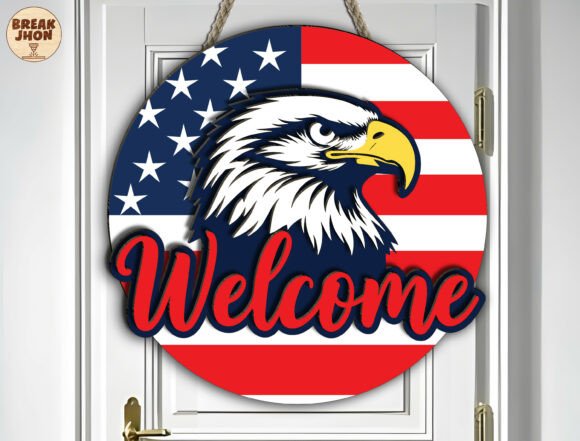
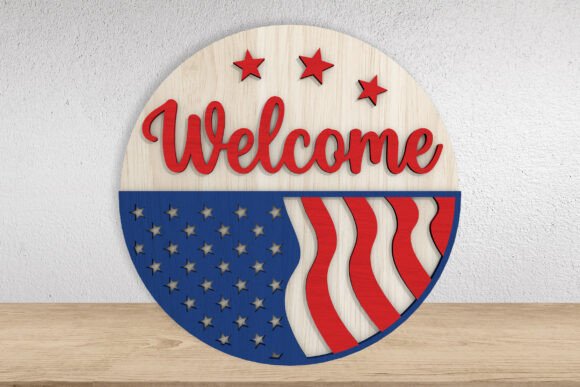
When you purchase a digital design file, you are not buying a physical object. You are acquiring a blueprint—a set of instructions for your machine to follow. The product description highlights that this specific design features an elegant multi-layered laser cut construction with a unique wavy American flag and stars combined with a welcome script. This complexity is what gives the sign its depth and visual interest. To achieve this, the creator has provided a comprehensive ZIP file containing multiple formats: SVG, AI, DWG, EPS, DXF, and PDF.
This variety is intentional. Different software platforms handle vector data differently. For instance, Adobe Illustrator users will appreciate the native AI file, while those using CorelDRAW might prefer the CDR or EPS format. If you are working with open-source tools like Inkscape, the SVG or DXF files are your best bet. By providing all these variations, the designer ensures that regardless of your technical setup, you have a viable path to production. However, having the files is only half the battle; knowing how to interpret them is the other.
Common Misconceptions About File Compatibility
One of the most frequent errors beginners make is assuming that one file type works universally across all machines without adjustment. While a DXF file is widely compatible, the scale and orientation might need tweaking depending on whether you are using a Glowforge, a Silhouette Cameo, or a CO2 laser cutter. Another oversight is ignoring the layer structure. A "multi-layered" design implies that different parts of the image (the flag waves, the stars, the text) must be cut from separate pieces of material and then assembled. If you send the entire flattened PDF to your cutter as a single job, you will end up with a flat, unimpressive piece of wood or acrylic instead of a striking 3D sign.
To avoid this, always open the files in your chosen software before sending them to the machine. Check the layers panel. Ensure that the cut lines are on a dedicated layer, usually colored red or assigned a specific color code that your machine recognizes as "cut" rather than "engrave." This distinction is vital because engraving burns the surface, while cutting slices through the material. Confusing the two can ruin your material and potentially damage your machine’s lens if the power settings are incorrect for the intended action.
Material Selection and Preparation
The aesthetic success of your Patriotic American Flag Welcome Sign depends heavily on the substrate you choose. Laser cutting behaves differently on various materials. Birch plywood is a popular choice for its smooth grain and affordability, but it can sometimes leave charred edges if the laser speed is too slow. Acrylic provides a vibrant, modern look, particularly for the flag elements, but requires precise focus adjustments to ensure clean cuts without melting the surrounding area. MDF is another option, offering a uniform surface that takes paint exceptionally well, though it produces more dust during cutting.
A common mistake here is skipping the sanding process. Even with precision-engineered files, laser-cut edges can sometimes feel rough or have slight burrs, especially on thicker materials. Taking the time to lightly sand the edges before assembly significantly elevates the perceived quality of the final product. Furthermore, consider the thickness of your material. The design files are likely optimized for standard sheet thicknesses, such as 1/8 inch or 3mm. Using a material that is significantly thicker may require you to adjust the kerf compensation in your software, or the pieces may not fit together as tightly as intended, leading to gaps in the layered effect.
Assembly Techniques for a Professional Finish
Once your pieces are cut, the assembly phase determines the longevity and stability of the sign. Many creators rush into gluing every piece immediately. Instead, take a dry run. Lay out all the components according to the design’s layer order. This allows you to spot any cutting errors or warped pieces before adhesive is applied. When you do begin assembling, use a strong, clear-drying adhesive like cyanoacrylate (super glue) for acrylics or a wood-specific PVA glue for timber. Apply the adhesive sparingly to avoid squeeze-out, which can mar the clean lines of your design.
Another overlooked detail is alignment. Because the design features a wavy flag and scattered stars, maintaining symmetry is key. Use registration marks or careful manual alignment to ensure the flag waves flow naturally and the stars are distributed evenly. If you are mounting this outdoors, consider weatherproofing. Standard wood glue may not hold up against humidity and temperature fluctuations. Using an outdoor-rated adhesive or sealing the finished sign with a polyurethane coat can protect your investment and keep the colors vibrant year-round.
Evaluating Your Purchase Decision
Before clicking "buy," it is essential to evaluate whether this digital product aligns with your skill level and equipment capabilities. Do you have access to a laser cutter? If you are relying on a local maker space or a print-on-demand service, ensure they accept the file formats provided. Some services have restrictions on file types or require specific resolution standards for raster images included within the package. Additionally, verify that your software version supports the file structures used. Older versions of some programs may struggle with complex compound paths or grouped objects found in advanced designs.
For those who are not technically inclined, remember that basic knowledge of vector editing is required. You do not need to be a graphic designer, but you should be comfortable opening a file, resizing it to fit your material dimensions, and organizing layers. If you find yourself struggling with the software interface, consider starting with simpler, single-layer designs to build confidence. The learning curve for laser cutting is steep at the beginning but rewards patience with beautiful results.
Maximizing Versatility and Value
The beauty of this Patriotic American Flag Welcome Sign design is its versatility. While marketed for Independence Day or Memorial Day, the neutral tones of natural wood or white acrylic allow it to serve as a year-round patriotic display. You can experiment with color combinations beyond the traditional red, white, and blue. Gold accents on the stars or navy blue backgrounds can create a sophisticated, timeless look suitable for a front porch or office entrance. This adaptability increases the value of the digital file, as you are not limited to a single seasonal use.
In conclusion, creating a stunning 3D welcome sign is entirely achievable with the right preparation. By understanding the importance of file formats, respecting material properties, and taking care in the assembly process, you can transform a simple digital download into a cherished home accent. Avoid the pitfalls of rushed assembly and incompatible settings, and focus on precision and patience. The result will be a proud, polished addition to your decor that reflects both your craftsmanship and your spirit.